Skip to main content Skip to navigation

Textile page template

Textile is a markup language to format plain text, which converts to HTML when you publish your page. Use the textile page template to format your content using the Textile markup language instead of the Components Editor, the old visual editor or raw HTML editor.

In this article:

Create a new textile page

  1. Browse to the page under which you want to create a new textile page.

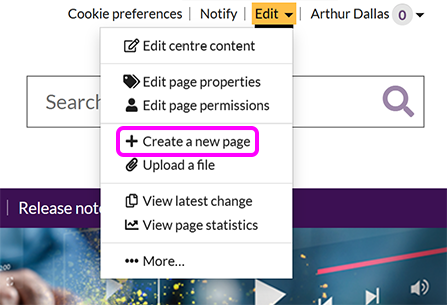
  2. Go to Edit > Create a new page:

    The SiteBuilder 'Edit' menu, with the 'Create a new page' option highlighted

  3. On the Create new page screen, select Classic editor.

  4. Select the Change button, then choose Textile page from the list of templates:
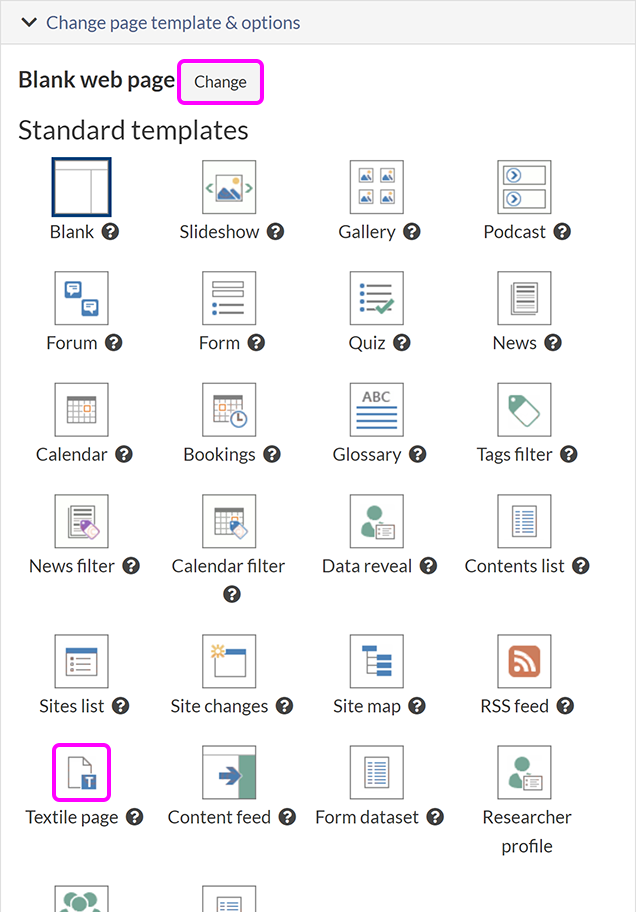
    The classic editor template list, with the 'Change' button and 'Textile page' template highlighted

  5. Enter the rest of the page properties: URL, Page heading, Title bar caption and Link caption. For more guidance on these properties, see our article on how to create a new blank page.

  6. When you have finished editing the page properties, select the Create new page button. You see a confirmation message with a link to view the new page.

Textile syntax

Textile markup Converts to HTML
this is *very* important this is very important
I think _Moby Dick_ is a great book I think Moby Dick is a great book
I'm away on the 23^rd^ June I'm away on the 23rd June
Water is also known as H~2~0 Water is also known as H20
I'm away on -Monday- Tuesday I'm away on Monday Tuesday
A list of colours:

* Red
* Yellow
** Pale yellow
** Strong yellow
* Green

A list of colours:
  • Red
  • Yellow
    • Pale yellow
    • Strong yellow
  • Green
A numbered list:

# First item
# Second item
# Third item

A numbered list:
  1. First item
  2. Second item
  3. Third item
|A|simple|table|
|with|rows,|columns,|
|borders|and|cells|
A simple table
with rows, columns,
borders and cells
Visit the "Google":https://google.com home page Visit the Google home page
Visit the "Google (search engine)":https://google.com home page Visit the Google home page
Google's home page is https://google.com Google's home page is https://google.com

h2. Heading level 2

h3. Heading level 3

Heading level 2

Heading level 3

On Monday, Pat wrote:

bq. Should we meet on Tuesday or Wednesday?

Let's meet on Wednesday.

On Monday, Pat wrote:

Should we meet on Tuesday or Wednesday?

Let's meet on Wednesday.

Here's an image:

!acrobat.png!

Here's an image:

The Acrobat logo

An image with alt text:

!acrobat.png(Acrobat)!

An image with alt text:

Acrobat

An image as a link:

!acrobat.png!:https://acrobat.adobe.com

An image as a link:

The Acrobat logo

Acronyms:

REM(rapid eye movement) signifies deep sleep

Acronyms:

REM signifies deep sleep

Related articles

Let us know you agree to cookies