
Group inductions and guidance
Guidance for successful and efficient research within "Quantum Device Modelling Group”
Our research is guided by the principles outlined in the group manifesto, available here.
At the Quantum Device Modelling Group, we aim to conduct vibrant and high-quality research, and to compete on a world stage. We collaborate with a large number of international and national research teams, and at any one time, we may have as many as >20 research projects running concurrently. Therefore, we need an efficient management structure and set of guidelines to conduct successful and productive research.
This guideline explains activities that should be adopted by all members of the group and involve the sharing of resources such as High-Performance Computing (HPC) and our collective time and efforts. To ensure that these are utilised efficiently, the description below provides guidance on how these resources should be used, to the benefit of all group members. This guide applies to everyone joining the group, including postdoctoral research fellows, PhD, and project students.
For any matter not covered in this guideline, the group members should seek advice from Prof. H. Sadeghi (HS) or Dr. S. Sangtarash (SS).
(1) Activities vs. Project Related Tasks (PRT)
When discussing the research undertaken by our group, it is useful to distinguish between activities and project related tasks (PRT).
a. Activities
During the early stages of your PhD (or MEng/BEng projects), HS/SS will suggest that you undertake a series of activities, including reading appropriate textbooks, attending tutorials, reviewing the literature, improving your analytical and programming skills, utilising group codes and demonstrating that you can use those skills and codes in a research context. Activities may also be undertaken at later stages, aimed at generating new technical capabilities and exploring new concepts. Such activities are not intended to lead directly to publications. However, they may underpin later PRTs and associated outputs.
b. PRTs
In contrast with “activities”, each “PRTs” is expected to lead to a publication on a specified timescale, sometime with an outside collaborating group. To avoid overlap between our many research projects, HS/SS maintains a spreadsheet of all projects, which is updated regularly. For this reason, all PRTs must be agreed in advance with HS/SS. Each project will have a tentative title, a list of people involved in the work (including outside collaborators) and a target timescale for completion. Tasks undertaken within the PRTs should be agreed with HS/SS.
PRTs are important for your PhD (as well as MEng/BEng projects), because each completed PRT and the resulting publication will form a basis for a chapter of your thesis. Assignments of new PRTs are decided and distributed by HS/SS. If you have an idea for a new PRT or an activity, you need to discuss this with HS/SS before calculations are initiated. A PRT is defined as finished only when the paper is accepted for publication.
Examples of the tasks needed to complete a PRT are as follows:
-
- Read and understand the background literature.
- Understand the expected outcomes of the project.
- Understand the concepts and technical capabilities needed to complete the project.
- Complete the initial calculations.
- Produce a document in which your results are presented in a logical manner, containing a clear description of each figure.
- Compare results with prior expectations, with the literature and with results of our collaborators when applicable. Usually agreement is not reached initially and a fresh round of calculations may be needed.
- Interpret results using the background theory learnt in our tutorials.
- Create a first draft of the paper and contribute to the later revisions.
- During the review process, contribute to the reply to the reviewers
- Present your results in a group seminar.
It is essential that all 10 steps are undertaken and completed. Students often would like to undertake several concurrent PRTs, because they believe that steps 4 and 6 alone are sufficient. This is unrealistic, because experience with only steps 4 and 6 would not allow you to pursue an independent research career after completing your PhD. For this reason, students should not normally expect to carry out more than two or three concurrent PRTs. Once a PRT is finished, a new PRT will be agreed with HS/SS.
Each PRT should include a time line and expected end date. For collaborative PRTs that involve external collaborators, the collaborators' time line and priorities should be taken into account.
It is expected that each PhD thesis should include at least three PRTs. For MSc and undergraduate student projects, the dissertations is expected to include at least one PRT.
(2) Efficient use of time and resources
a. Project meetings
All students should meet at least once a week with HS/SS to discuss their progress and receive feedback and guidance. At least once a month, their meeting attendance should be recorded in TabulaLink opens in a new window. It is the students' responsibility to arrange meetings with HS/SS.
b. Progress review meetings
The students' progress will be reviewed every three months in progress review meetings. This will include reviewing the progress since the previous meeting, setting objectives for the next three months, and identifying any support needed. It is the students' responsibility to arrange meetings with HS/SS. See PRM page for more information.
c. Efficient use of resources
The HEC which includes three clusters (Avon, Orac and Cluster of Workstations (CoW)) is a valuable resource for the group and should only be used to perform agreed PRTs and activities. Performing unnecessary calculations takes away valuable computational resources from the rest of the group and may slow down the research of other group members as well as other groups in the department/university.
Orac and Avon should be used to perform parallel calculations using one or multiple nodes e.g. for DFT calculations using Siesta, Gaussian, etc. CoW is mainly for code development, running serial jobs (e.g. GOLLUM jobs) and testing. No more than one node should be requested for each job in CoW.
To apply for access to the clusters, follow the instructions given in the links below:
CoW: https://warwick.ac.uk/research/rtp/sc/desktop/gettingstartedLink opens in a new window
Avon and Orac: https://warwick.ac.uk/research/rtp/sc/hpc/registerLink opens in a new window
d. Computational tools and their distribution
Some of the codes and tools that we are using are subject to specific licence agreements. You will be given access to use these tools by HS's authorisation. To avoid violating the licence terms, the source code or executable created within the group or used by group members such as GOLLUM, Gaussian, etc. must not be distributed to others. This includes other group members and people from outside the group. Any request that you may receive should be directed to HS.
e. The university and school regulations and policies
All PhD students should fameliarise themselves with the university regulations and policies such as
- Responsibilities of Research Students: https://warwick.ac.uk/services/dc/policies_guidance/pgrstudent
- Supervision and Monitoring Guidelines of Doctoral College: https://warwick.ac.uk/services/dc/policies_guidance
- Guidance on PhD Submission, Assessment, and Examination: https://warwick.ac.uk/services/dc/submission
- School of Engineering Research Student Handbook: https://warwick.ac.uk/fac/sci/eng/ro/pgr
(3) Publications and presentations
a. Writing research papers
A research article or paper involves the following: a title; a list of authors and their affiliations; the corresponding author's email address (Hatef.Sadeghi@warwick.ac.uk); an abstract (~300 words); an introduction including a relevant literature review (~4 paragraphs); results and discussion (the length varies depending on the paper, but it normally includes 4-6 figures with captions and 8-10 paragraphs); conclusions (1-2 paragraphs); computational methods; acknowledgements; references. We also normally include additional information such as additional figures in a separate document called "Supporting Information". It is good practice to start writing the paper for each project parallel to carrying out calculations. This helps to identify any gaps in the research, and what you do and do not understand.
b. Reviewing report, publication and thesis
The final version of any document for submission in any form by group members, such as draft journal papers, posters, presentations, and reports, should be reviewed and approved by HS or SS before it is submitted or communicated. The review can take 1–3 weeks, depending on the length and quality of the work. Implementation of the feedback provided can also take time, so you need to allow sufficient time before the deadline for the review process. It is recommended that the documents should be ready for review about one month before the submission deadline.
c. Group seminars
All students and postdocs are expected to give talks, as the ability to present your work is a key requirement of a scientific researcher. In each seminar, one person will give a 30-minute talk, followed by a 15-minute discussion and Q&A. Each talk should include an introduction, a literature review, a methodology, results and discussion, and conclusions. Acknowledgements and a discussion about the next stage planned for ongoing projects should also be included. See Group Seminar page for more details.
d. Group logo, affiliation and templates
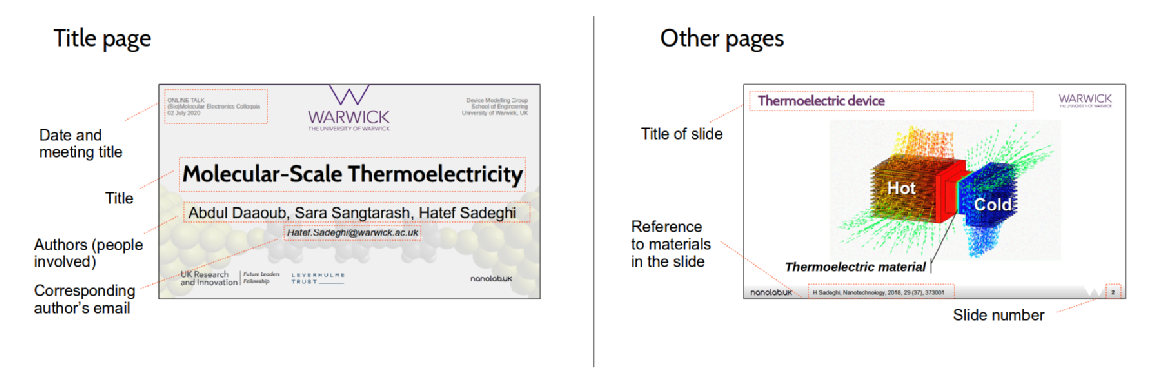
i. Presentation slide template: The data should be presented in the presentation format e.g. PowerPoint slides for each meeting with HS/SS, meeting with collaborators, group seminars and conferences. For this, all group members are advised to use the group presentation template (available on the seminar page). Each presentation should involve a title page including: title of the project, all authors' names, the group affiliation, date, a link to the group page (www.warwick.ac.uk/nanolab), the group's logo and the university's logo. An example is shown below:
ii. Poster template: For any poster presentation, you need also to use the group poster template available for windows and linux. Each poster should involve a title page including title of the project, all authors' name, the group affiliation, a link to the group page (www.warwick.ac.uk/nanolab), the group's logo and university’s logo and corresponding author [email: Hatef.Sadeghi@warwick.ac.uk].
iii. Group affiliation: Device Modelling Group, School of Engineering, University of Warwick, CV4 7AL Coventry, United Kingdom
iv. The logo of the group and university
|
Group’s logo |
 |
|
|
University’s logo
|
 |
 |
(4) Communication of the results and idea
a. Communicating with collaborators
Communicating with collaborators normally takes place through HS/SS. Any other communication with external collaborators needs to be discussed with HS/SS before it takes place. HS/SS should be CC’d in any email communications with collaborators. We may also visit collaborator groups and have discussions or host visitors from other groups.
b. Protecting intellectual property (IP): patents and publication
Our research projects have the potential to create intellectual property, such as patentable material. The patentable results that are not protected by intellectual property (IP) must not be shared or discussed with others. Otherwise, this may mean that the results cannot be protected as a patent where applicable. Group members are encouraged to discuss this with HS/SS for more details.
The same principles apply to research findings for publication. Unpublished results must not be discussed with others before publication. In occasional cases, we may discuss unpublished results with trusted collaborators, but such discussions require the approval of HS/SS before they can take place.
(5) Data management and security
The University Data Management Regulations available at www.warwick.ac.uk/services/sim apply to all data. All group members must read and comply with these regulations. All data and knowledge generated by group members, including theoretical concepts, simulation data from HEC, codes, and documents such as reports and manuscripts, should be regularly backed up safely as follows:
|
Data |
Period |
Where to back up |
Note |
|---|---|---|---|
|
Draft manuscripts, reports, presentations and posters (all versions) and their final version |
As they were generated |
Shared folder with HS or SS |
|
|
Input files and important output files of computed data from CoW, Orac, Avon and your computer |
As they were generated |
Your external hard drive |
The important data includes input files to run simulations, submission files, xyz coordinate of structures. The important output files include Siesta output file, EIG file, etc. |
|
At the end of the project |
Create an archive in the shared folder with HS or SS |
||
|
Simulation data from CoW, Orac, Avon for on-going project |
Every month |
Group repository and your external hard drive |
All data should be backed-up. |
|
Simulation data from CoW, Orac, Avon at the end of each project |
At the end of the project |
An archive version of all data should be created and properly documented for future use. |
|
|
Codes and scripts |
As they were created |
Shared folder with HS or SS |
|
Group storage in HEC
The group directory is located in /storage/essfbf_grp in cluster of workstations (godzilla).
To access your folder in group storage, you can use following addresses:
From godzilla: /storage/essfbf_grp/[your username]
From Orac or Avon: /desktop/storage/essfbf_grp/[your username]
Replace [your username] with your username. For example, if your username in HEC is "essabc", the address of your folder is "/storage/essfbf_grp/essabc" in godzilla.
A good practice is to create a folder for each project in your group storage folder and then copy the relevant files from different clusters into that folder. For example, to copy the relevant files to project 1 that is in the folder called "benzene" located in "/home/eng/[your username]/benzene" in Avon into project 1 folder in your group storage folder called "prj1", you need to login to your Avon account first and in the terminal write:
cp /home/eng/[your username]/benzene /storage/essfbf_grp/[your username]/prj1
Again, replace [your username] with your username. Note that if you have two folders with same name in different clusters, and would like to copy them into the same folder in your group storage folder, you should use different names in the destination, otherwise you may overwrite the old folder.