
Module assessment
How modules are assessed
There are a variety of ways in which modules can be assessed, i.e. how you overall mark for a module is determined:
- 100% examination. This means that all of your mark is determined by, usually a single examination, normally taken in term 3.
- Majority examination with small assignment component, typically 85% exams and 15% assignments (usually coming from four assignment sheets).
Most modules with four problem sheets operate the best 3 out of 4 policy, which discounts the worst mark amongst the four assignments. - 100% coursework. This means that there is no examination for the module and your module mark is determined by some combination of other types of assessments (e.g. MA124 Maths by Computer).
See this page for information about exams. The rest of this page contains guidelines on other forms of assessments.
Feedback
Feedback on your work is not just written comments on a piece of work. They also include the following.
- Any mark you get is a form of feedback. If you get a disappointing mark, do go over the work again and go back to the marker if you do not understand something. Do this straight after you get the feedback, not when you start revising for exams.
- Feedback from supervisors: In the first year, assignment sheets marked by your Supervisor will have written comments on as well as the mark, and your engagement with supervisions will be crucial to aiding your understanding of the work and where you could improve.
- Feedback from TAs: Assignment sheets marked by Support-Class TAs may have less written feedback due to the number they have to mark in a short time so they can get it back to you as soon as possible. However, the marks you receive for each question will tell you how you have done. The Support Classes will often highlight common mistakes. These classes are also the opportunity to ask questions, so it is important to engage with them.
- Online quizzes: You will have some online quizzes for some of your modules. Some of these quizzes have instant feedback, but some solutions are released later.
- Feedback on essays and projects (MA262 Scientific Communication, MA395 Third-Year Essay and MA4K8/9 Maths in Action or R-Projects). There is ample opportunity to get feedback in these modules by regularly engaging with your supervisor and getting comments on your drafts.
The University's guideline is that feedback on an assessed work should be given within 20 working days. However, as a department, we aim for a much shorter turnaround for problem sheets.
Deadlines, extensions and waivers
Please review the table of deadlines, waivers and extensions, alongside the information below, when making either an extension or flexible deadline waiver request.
Deadlines
Most deadlines are set at 12 noon, but check with your module pages.
Extensions and Late Penalties
- For substantial pieces of work worth 3 CATS or more (provided solutions are not discussed in class) extensions are permitted. The deadline policy follows the University's policy on assessmentsLink opens in a new window. In particular, note the late penalty of 5% per working day (or part thereof). The penalty will not necessarily be applied immediately, but will be processed for approval at the exam boards.
- Where extensions are permitted students must submit a mitigating circumstances case 2 working days in advance of the deadline, detailing the extension request. Supporting evidence must be provided in line with the mitigation policy, note students with flexibility with deadlines do not need to submit supporting evidence providing their adjustments have been agreed on their Tabula profile. The maximum extension length permitted is 5 university working days. Cases can be submitted via the 'Personal Circumstances' tab on Tabula. Approval will be confirmed via a message on the mitigation case.
- For problem sheets (marked by supervisors or TAs) or smaller pieces of work worth 2 CATS or less, or those for which solutions may be discussed in class shortly after the deadline, no extensions can be granted. If you are late, it will still be marked for feedback but you will score 0. Your supervisor or TA will still give you the mark you would have got but this will be reduced to 0 at a later stage.
- If you have a legitimate reason for handing in late, you can submit mitigation (with evidence). This can lead to the piece of work being waived. In any case, for problem sheets, the department will first apply the best 3 out of 4 policy.
Please do not submit mitigations based on technological difficulties (e.g. poor internet, misbehaving computers, accidentally deleting or overwriting a file). These mitigations are automatically rejected.
More about Mitigating Circumstances hereLink opens in a new window.
Self-Certification
Self-certification is a process by which a student declares an illness or mitigating circumstance without the need to submit evidence, in order to waive a piece of work.
For most students, no mathematics assessments can be self-certified.
However, following our conversation with students with disabilities, some students with reasonable adjustments are granted one self-certification per module. Please read below.
Flexible Deadline Waivers
If a student has flexibility with deadlines listed as a reasonable adjustment they can claim for eligible assignments to be waived. This means that it would not count towards your overall assignment mark. The usual calculation where the lowest mark is discounted would then be applied. More information about this can be found in the Reasonable AdjustmentsLink opens in a new window section of the handbook.
Machine Readability
Some written assignments (e.g. essays and reports produced with LaTeX) are processed by the anti-plagiarism software Turnitin. This requires the assignment to be machine readable. The following guide should be followed to make sure that your work is machine readable.
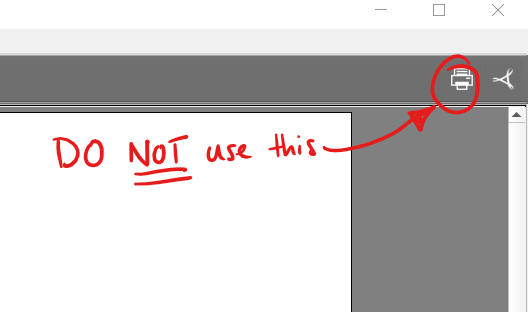
Do NOT use the "Print to PDF" function! This is known to produce files that are not machine-readable.
The easiest method to check machine readability is to search the pdf using any software, such as Adobe Acrobat Reader, that does not have optical character recognition built in (do not use Mac OS's Preview software to do this). Search for a common word; if it is able to search the text, then it is machine-readable. Try a few words to be sure.
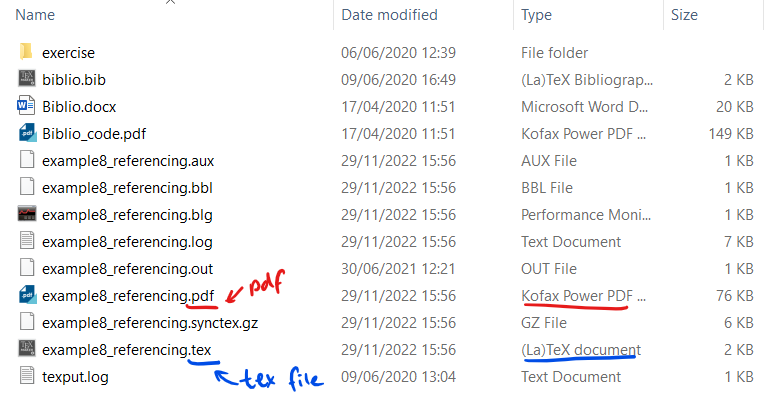
To find the pdf created when compiling with TeXmaker, for example, look in the folder where the tex file was saved. There should be a pdf file with the same name. This pdf should be machine readable:
Do NOT open and re-print to pdf. Printing to pdf causes files to lose their machine-readability:
For further tips on using LaTeX, see Andrew Brendon-Penn's Maths-focused LaTeX guideLink opens in a new window.