
4.1 Searching for online sources using Google
Searching for online sources using Google
How to search for sources of jobs online using Google
Google: Searching for job sources
As they say when you want to start something, it is important to start with the basics and what you know and build on that. I am aware that most of you use Google regularly and are very familiar with it, so we will start with how to use Google to search for jobs and job sources.
Once you open Google on your browser you can either: Type in the search bar; OR Click on the microphone icon on google and say what you want to search for.
Here we want to start with a broad search, so we type our search query or what we want to search for in. In this example, I want to search for jobs in my area which is Amman so I would either type or say "Jobs in Amman" and then click Enter on the keyboard. Something similar to the below picture will appear on your screen, with the following features:
1. The top part (in yellow below) are the results from Google jobs (circled in orange). These are all the jobs posts that Google collected from different sites that are related to what you are searching for in this case Jobs in Amman.
2. The second part are the google search results (in green below), which links to websites that have something related to what you were searching for. In this example, jobs in Amman.
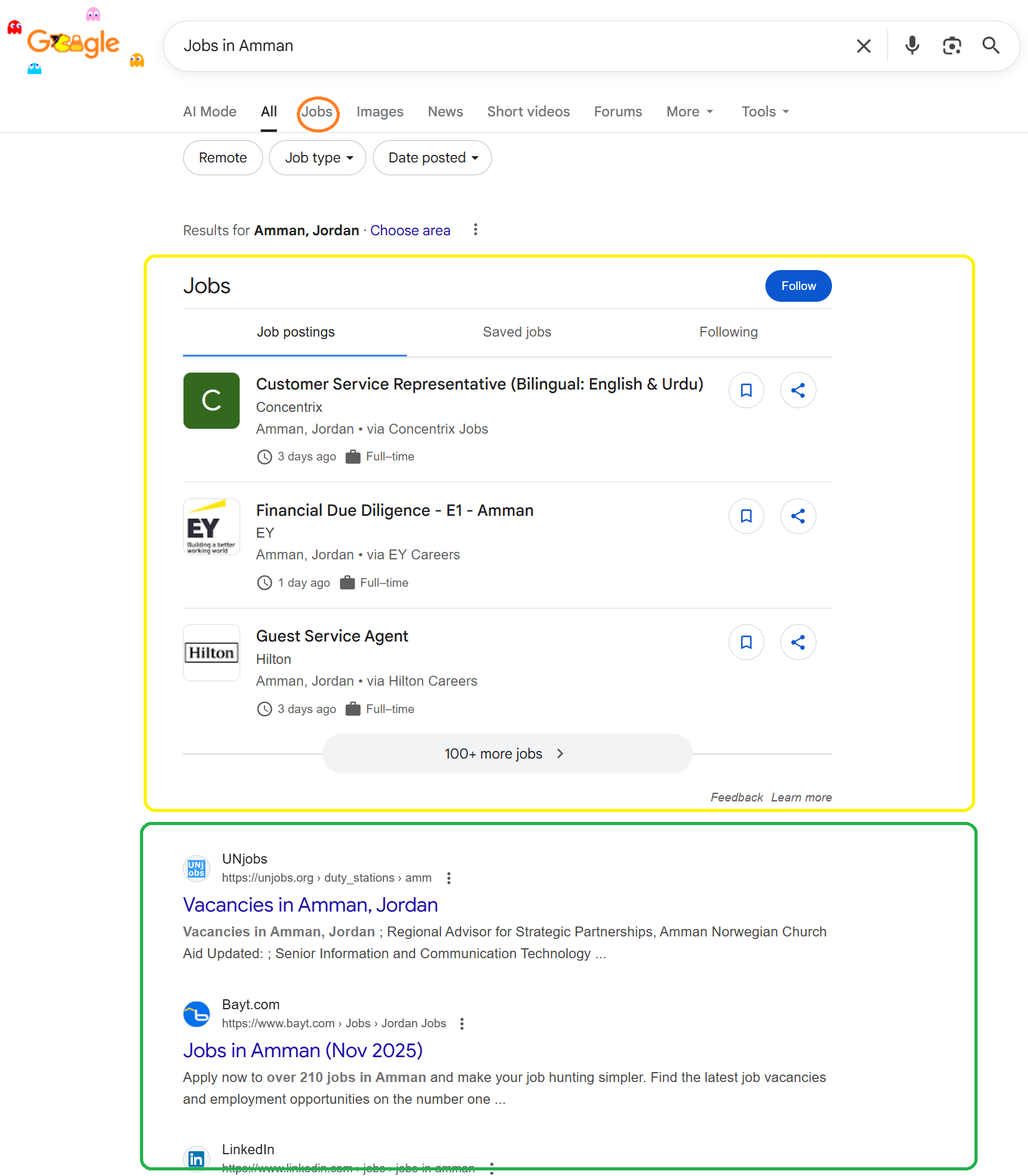
Google search results for jobs in Amman
As you all well know, the internet and Google provide you with a vast sea of information that you can easily get lost in if you do not know how to search in an efficient way.
To make your online job search on google efficient you would need to do what is called “refine your search” also known as Advanced google search. Which is basically making it as specific as possible to what you a searching for.
Refine your search (Advanced Google search):
To do this you would need to add keywords to your job search and conduct an advanced job search. Remember keywords are specific words that describe a skill or quality or characteristic of a specific job (as mentioned in
When you are searching for a job, these keywords could be:
1. Logistical: Location of the job, type of employment (part-time or full time), working hours (morning, night, weekends). For example, Jobs in Amman or part-time jobs.
2. Job field specific: The job area or field you want to work in. For example, cooking jobs or teaching jobs.
3. Skills specific: Jobs that require a specific skills set. For example, jobs for creative writers, jobs for people who cook, jobs for people who like kids.
These three types of keywords can either be used:
1. Alone: For example “Jobs in Amman”.
2. A Combination: For example “cooking jobs in Amman” or “part-time jobs for people who like kids in Amman”.
As mentioned earlier the more specific your search term is (also known as search query) the more likely the information that would appear would be relevant to what you are looking for.