
Deposit a file for a claimed publication record
The CRIS, Symplectic Elements, harvests data about publications from a range of external sources, and suggests these to you to claim or reject. You should act on acceptance when notified that your research is going to be published, and not wait for Elements to prompt you. If this has not been possible, and Elements has identified that your research has been published and created a record for you to claim, you must upload the file.
Step 1: Follow the prompt
1. If you have claimed a publication that Elements has identified, it will prompt you on the homepage with a notification that you have publications awaiting deposit to the repository. For guidance on claiming publications, and adding your researcher IDs to support this, see the profiles user guideLink opens in a new window.
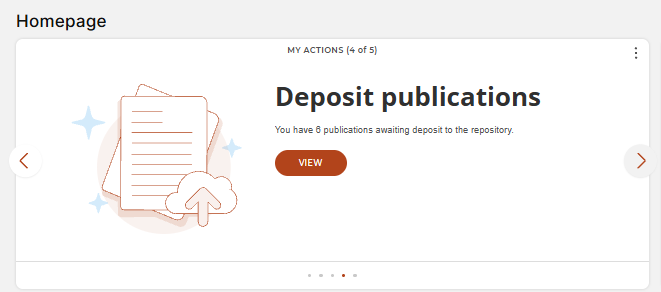
2. Click 'View'. This will take you to a list of the publications that require a deposit.
Step 2: Add the file(s)
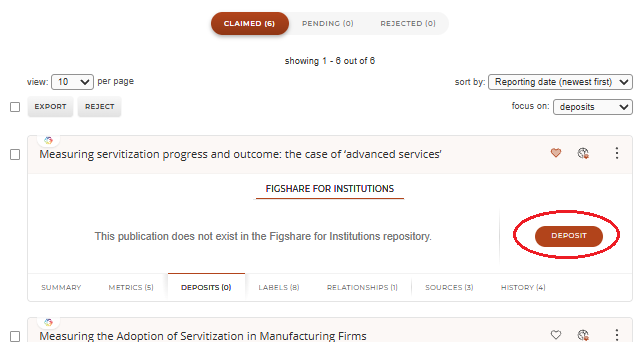
1. . Click 'Deposit' next to the publication whose file you are adding.
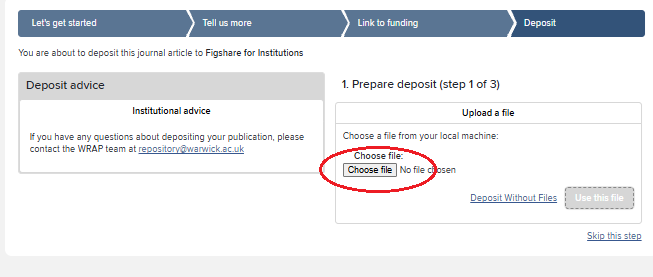
2. Add a file by clicking 'Choose file'. You can't batch upload files, but you can add several to your record one-by-one.
4. The WRAP team in the Library & Archives will check every file uploaded and make it as open as they can, complying with any OA requirements and the publisher's policy.
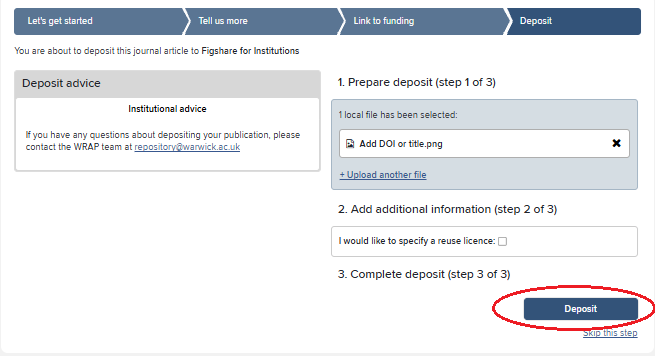
5. If you wish to add a reuse license, tick the box and select a license from the drop-down menu.
6. If you are not sure which license to choose, leave this blank and the WRAP team will select a suitable option.
7. Click 'Deposit'.
Other guidance
Acting on acceptance: Creating a record and adding a file
Requesting changes to your record