
10.2.2 Tracking your job application progress
10.2.2
Tracking your job application progress
This is part of organising your applications, and helps you know the next steps for each job application you submit
There are several ways you can track your job application process; the most commonly used way is using an Excel or Google sheets.
Both Excel and Google sheets work in the same way and they allow you to see all the job applications you made and what is happening with each application.
Tracking your applications is needed mainly for you to see what needs following up and what you have applied for before.
The steps to using an Excel sheet or a Google Sheet are the exact same steps explained in section 1.2 Link opens in a new window on using Microsoft Office and similar programs like Word document (if you have Microsoft) or a Google Doc.
The only difference is that Microsoft Excel lookslike this (left) if you have Microsoft and Google Sheets look like this (right) from your Google account if you do not have Microsoft.
 Microsoft Excel (MS Excel) icon
 Google Sheets icon
Your job application tracking sheet should look like something like this:
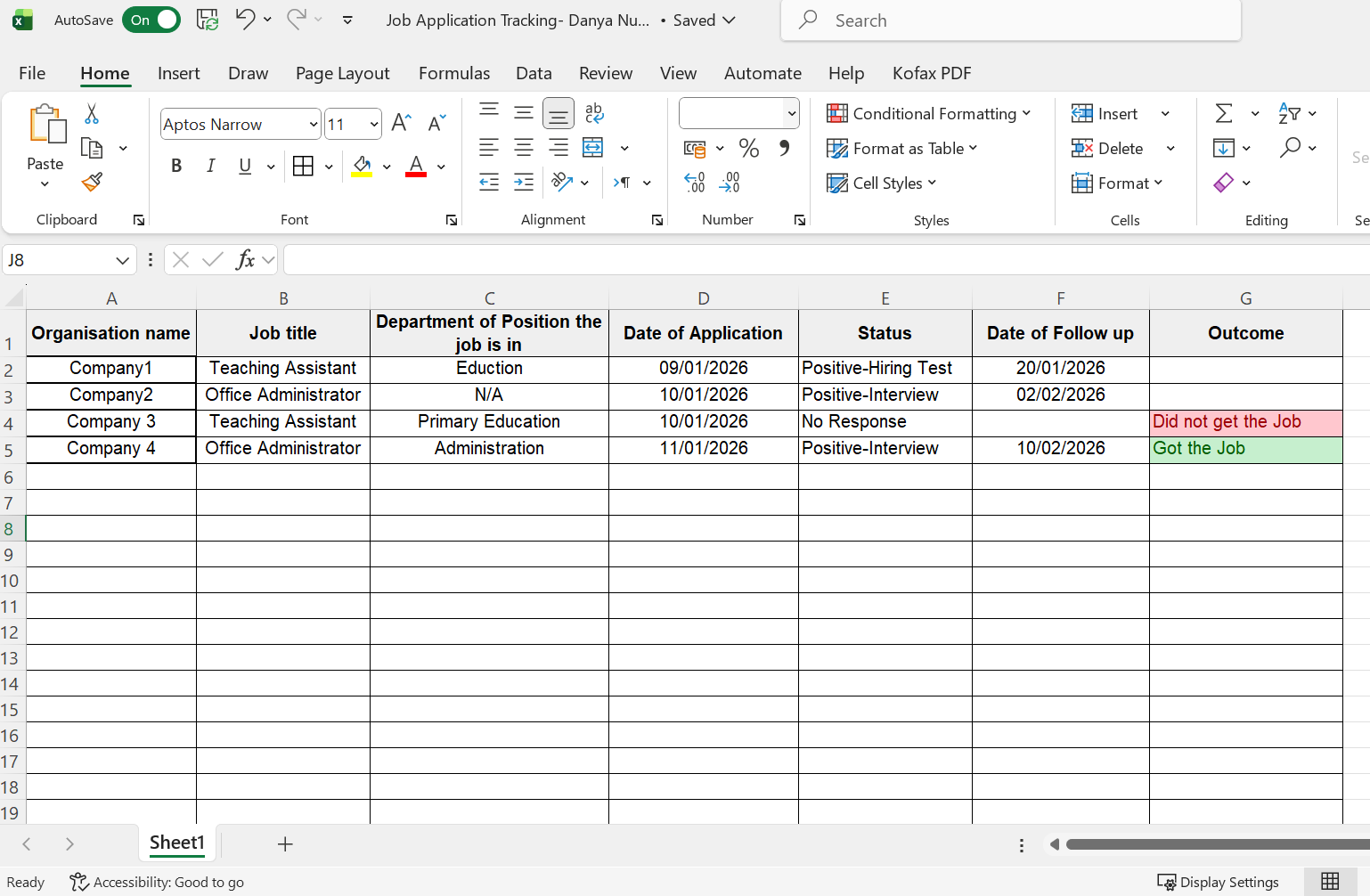 Example of a job application tracking sheet
At the end of this module ( Module 10- Videos and templatesLink opens in a new window), I have provided you with a Microsoft Excel and Google sheets templates that you can use to track your job applications.