
Information for Phase 1 MB ChB Teachers
Any questions?
If you have any questions, or would like to know more about the Phase I curriculum, please contact either the academic lead who invited you to deliver this session or
Dr Greg Moorlock, Academic Lead for Phase 1
Thank you
We really appreciate you taking the time to teach our students. We will send any feedback relating to your session from the end of block feedback forms.
Phase 1 Lead


Welcome
Introduction
Our 4-year MB ChB programme is the largest graduate entry course in the UK. Our students come from a wide variety of backgrounds. While some have joined us straight from their undergraduate degrees, others have come to us after spending years working as professionals in a wide range of careers. We are one of only a few medical schools to accept students from any degree discipline, with many joining us having never studied science before. We ask that you please bear this in mind when you are preparing and delivering your teaching material.
Our students come to us motivated, accomplished and keen to learn.
About
Phase I (the first year of the course) is delivered largely through University-based teaching, including integrated clinical exposure in both hospital and community settings. Educational activities include case-based learning, live or recorded learning sessions, small group sessions, experiential learning, clinical skills and e-learning.
Structure
Phase 1 is organised into a short introductory block followed by five blocks of five weeks’ learning, each focussing on the foundations of science and medicine. The five blocks are:
Block 1: Health, Metabolism and Homeostasis
Block 2: Blood, Lungs and Heart
Block 3: Brain and Behaviour
Block 4: Locomotion
Block 5: Reproduction and Child Health
Assessment
Phases 1 use hybrid Short Answer Question (SAQ)/ Multiple Choice Question (MCQ) papers
If you have any questions, or would like to know more about the Phase I curriculum, please contact either the academic lead who invited you to deliver this session or
Dr Greg Moorlock, Academic Lead for Phase 1 g.moorlock@warwick.ac.uk
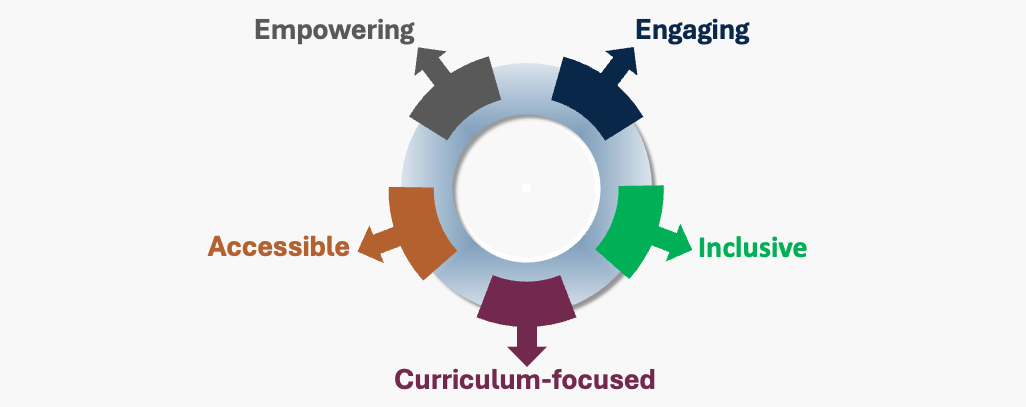
Medical Student Teaching is...
- Builds on existing learning, supporting learners to engage with new knowledge and skills
- Provides feedback and highlights areas for further development
- Evaluated and informed by feedback
- Interactive
- Stimulating and inspiring
- Case-based and/or clinically-relevant
- Supports all learners equitably
- Includes a diverse range of material & views
- Considers learning from diverse perspectives
- Directly linked to MBChB learning outcomes, assessment and institutional values
- Supports development towards meeting GMC standards for knowledge, skills and professional attitudes
- Connects with prior and future learning to support our spiral curriculum
- Learning opportunities and resources designed to be accessible to all
- Support for use of assistive technology & productivity tools
The learning outcomes for this session will be sent out with this document. Please ensure they are clear at the beginning & end of your sessions. They can often be used to provide clear structure to a session.
Warwick Medical School uses a case based curriculum so please include cases as examples in your lecture.
Please remember to include your name, role and ideally your email address on the title slide.
If you have previously delivered the lecture, please check your slides to ensure the information is still up to date and correct, particularly if you refer to specific guidance documents.
If you require any further information concerning the content to be delivered please contact the academic lead who invited you to deliver this session.
We believe the evidence supports active learning so please think about how you can embrace this. We have developed a web page with some ideas on how to do this. The university also has lots of ideas here
If you plan on using Lt for your teaching, please familiarise yourself with the Lt guide.
We have a drugs list for each phase, please use this as guidance if you mention drugs in your teaching. This can be obtained from Dan Mitchell D.Mitchell@warwick.ac.uk
If your lecture contains any information or images which may prove distressing or triggering to students please let us know in advance so we can warn students. It is also helpful to warn students at the beginning of the session and immediately before any such material. The range of material which may be triggering is broad and may include bloody images, eating disorders, self-harm, mental health problems, death and dying, & sexual violence.
Should any student become distressed please alert a member of staff and we will ensure they are supported.
If you believe your learning session requires a trigger/content warning, the following is suggested wording...
'I'd like to make you aware that this learning session contains some information on [x] which some students may find troubling or even distressing. This information will be covered in slides [y to z]. If you feel affected by anything we cover in this session do remember that support is available: please contact your personal tutor or a member of the student support team who will be able to help.'
26% of our students identify as having a disability. WMS strives to create an inclusive learning environment accessible to all MBChB students. We aim to ensure that every student is able to thrive at WMS & suggest the following to help this happen:
- We generally make content available to students on the Friday of the week that it is scheduled. Please let us have your content at least 48 hours before the session goes out.
- We have standard Powerpoint templates that meet accessibility guidelines. If possible, please use these.
- Space your text and use bullet points rather than full sentences
- Avoid putting too much content on each slide, please consider 24pt the minimum font size for PowerPoint slides
- Improve accessibility by using the Microsoft accessibility checker
- Don't assume extensive prior knowledge
- Explain abbreviations and acronyms
- Please check the auto-transcription of recorded content to ensure that it is accurate (particularly any medical terminology)
- Please enable closed captions on your videos.
- In order to enhance the student learning experience, the University of Warwick wishes to make available to its current students digital recordings of University lectures, presentations and seminars for learning and teaching purposes. A Recording may include the entire lecture, presentation or seminar and could capture image and sound recordings of the presenter and any visual aids within view of the camera. It is not intended to capture students. Recordings will not be used for any other purpose, and will be stored securely within the EU for a period of four years, after which time they will be deleted/destroyed. As a presenter we will ask your consent to the recording of your lecture. Please let us know if you don't want your session to be recorded.
Please familiarise yourself with GMC Welcomed and Valued - Supporting disabled learners in medical education and training
It is a University strategic priority that all staff and students must have access to equal opportunities to thrive and progress at Warwick, irrespective of background, disability, faith, gender, race and sexual orientation. Warwick is committed to developing accessible and inclusive approaches to ensure that everyone can participate in our community.
- Please ensure a diverse range of images are shown. If relating to clinical signs please ensure you show them on a range of skin tones. Useful resource here.
- Do highlight areas of health inequality relating to protected characteristics but avoid statements or contents that are discriminatory or insensitive.
- WMS has signed GLAAD's UK Medical School's Charter opposing so-called LGBTQ+ 'Conversion Therapy'. We are committed to ensuring that our curriculum includes authentic and joyful representation of LGBTQ+ people to challenge stigma and stereotyping.
- To promote inclusion and to ensure that all staff and students feel confident to pronounce one another's names correctly, we are asking ALL staff and students to add a brief sound recording of their name to their email signature. It's free and quick and easy to do, and full instructions are provided.
It is a University strategic priority that all staff and students must have access to equal opportunities to thrive and progress at Warwick, irrespective of background, disability, faith, gender, race and sexual orientation. Warwick is committed to developing accessible and inclusive approaches to ensure that everyone can participate in our community.
- Please ensure a diverse range of images are shown. If relating to clinical signs please ensure you show them on a range of skin tones. Useful resource here.
- Do highlight areas of health inequality relating to protected characteristics but avoid statements or contents that are discriminatory or insensitive.
- WMS has signed GLAAD's UK Medical School's Charter opposing so-called LGBTQ+ 'Conversion Therapy'. We are committed to ensuring that our curriculum includes authentic and joyful representation of LGBTQ+ people to challenge stigma and stereotyping.
- To promote inclusion and to ensure that all staff and students feel confident to pronounce one another's names correctly, we are asking ALL staff and students to add a brief sound recording of their name to their email signature. It's free and quick and easy to do, and full instructions are provided.
Please consider breaking pre-recorded sessions down into shorter chunks of up to 20 minutes with breaks for active learning tasks.
If you are asked to prepare a recorded session you can find guidance on how to record it:
- 'Create narrated PowerPoints and add to Moodle' guide
- Alternatively, you can record lectures directly in Echo360. See the 'Getting started with Universal Capture (Personal)' guide
- Asynchronous options available to support this include creating an online forum in Moodle, creating a virtual board using Padlet or using Vevox QandA feature.
- Synchronous options include scheduling a session using Microsoft Teams, scheduling an in person session for the whole cohort, or setting some scaffolded group work.
Every recorded lecture requires a transcript. This is automatically created when your video is uploaded to Echo360. Please check the transcript for accuracy. Especially, medical terms are often not picked up but are important for students to get right. 'Accessing the Transcript Editor' guide provides more information.
It is useful to also provide a forum for Q&A relating to your recorded session:
You could also consider a blended learning design that mixes asynchronous and synchronous options. Contact our MB ChB Senior Academic Technologists: email Cath Fenn, email Hannah Thein to talk through your plans and options.
Please note: The above guidance is for teachers with University of Warwick IT accounts.
Here we are sharing some tips on tech available to help you make good use of our digitally enabled spaces on campus.
Personal response system
Vevox is a personal response system which enables staff to create engaging sessions through live polling, quizzes, and Q&A. Staff create their session through the Vevox dashboard while students use the unique session ID to connect via smartphone, tablet or laptop.
Online pin boards and more
Padlet enables you to create online boards where students, tutors and colleagues can share and collaborate. Select from a variety of board types: wall, shelf, canvas, stream, timeline, map and grid.
Hybrid teaching refers to a scenario where teaching takes place at the same time for students who are physically present in the classroom and for students who join the classroom remotely via a web platform such as MS Teams.
Hybrid teaching can seem like an easy approach, but this way of teaching can also have significant challenges, look very different and vary in complexity. There is a lot to consider when exploring whether hybrid teaching is the best approach for you.
Visit the AV pages for full details of teaching room tech and review the training provided by AV
All MB ChB students have an iPad mini on loan and managed centrally by the WMS IT team.
All teaching session handouts can be shared with students via the cohort SharePoint sites. Classrooms can be paper free and students can annotate and keep digital copies of teaching materials for future use and revision.
The iPads are also pre-loaded with a range of apps that support learning.
We strongly encourage all teachers to consider actively including the use of student iPads in their sessions.
If you would be interested in loaning a set of iPads for facilitation of teaching please contact the WMS IT team who kindly manage these devices.
WMS-IT contact: WMS-IT@warwick.ac.uk
If you are interested in learning more about developing interactive sessions that incorporate the use of iPads please contact the MB ChB Senior Acdemic Technologists Cath Fenn: c.a.fenn@warwick.ac.uk Hannah Thein hannah.thein@warwick.ac.uk